
Netman Enterprise
Version 4.36
Shareware
$60.00
1 downloads
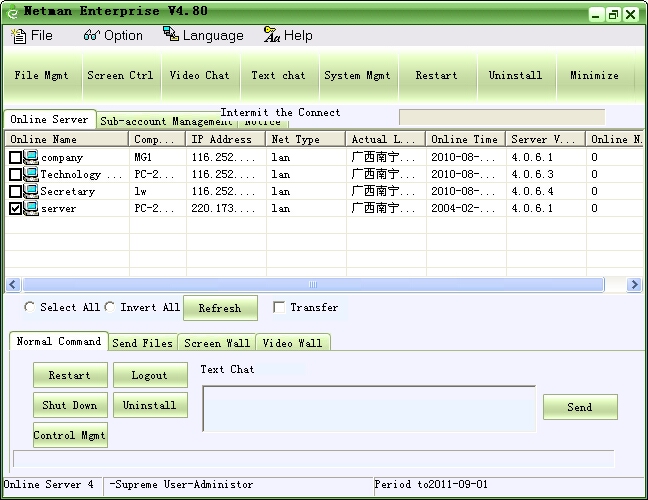
Netman Enterprise Edition is designed as a set of
remote control software that is primarily applied in
business remote management. This remote PC
controlling application can function behind NAT proxy
and firewall to aid you in controlling and managing
multiple PCs by performing various operations. The
utility allows performing different operations on
multiple PCs like viewing screens; turn on cameras
and watch videos; manage system operations like
restart, shutdown, etc; distribute electronic files;
send batch text messages; operate remote computer
through local keyboard and mouse; and even more. In
addition, it adopts DSE encrypt mode generally used
by banks, making itself safe and reliable.
Major Features:
1.File Management: Manage files in controlled
computer; upload, download files; resume transmission
at break-points and run files remotely, so as to save
your time and resources.
2.Screen Sharing: You can view partner's screen,
assist remotely, control his mouse and keyboard, take
pictures of the screen and record activities of the
screen. Fast controlling speed and smooth pictures
transformation will offer you a wonderful experience
of remote access.
3.Video Conversation: Video connect with controlled
computer, take pictures and record movements of
video, video chat.
4.System Controlling: Master processes and active
window, start other computers in the same LAN with
controlled computer
5.Restart/Shutdown: Restart, logout or shutdown
chosen controlled computer
6.Remote Uninstall: Remote uninstall controlled
computer's Netman Enterprise Edition's controlled
terminal program
7.Broadcast : Control mass of computers
simultaneously, chat, restart, shutdown in batches
etc
8.File Distribution: Achieve to distribute electronic
files to mass of computers simultaneously
9.Screen Wall: Monitor mass of computers' screen
simultaneously, able to switch to one controlled
computer's screen.
10.Video Wall: Watch plenty of computers' video
simultaneously
remote control software that is primarily applied in
business remote management. This remote PC
controlling application can function behind NAT proxy
and firewall to aid you in controlling and managing
multiple PCs by performing various operations. The
utility allows performing different operations on
multiple PCs like viewing screens; turn on cameras
and watch videos; manage system operations like
restart, shutdown, etc; distribute electronic files;
send batch text messages; operate remote computer
through local keyboard and mouse; and even more. In
addition, it adopts DSE encrypt mode generally used
by banks, making itself safe and reliable.
Major Features:
1.File Management: Manage files in controlled
computer; upload, download files; resume transmission
at break-points and run files remotely, so as to save
your time and resources.
2.Screen Sharing: You can view partner's screen,
assist remotely, control his mouse and keyboard, take
pictures of the screen and record activities of the
screen. Fast controlling speed and smooth pictures
transformation will offer you a wonderful experience
of remote access.
3.Video Conversation: Video connect with controlled
computer, take pictures and record movements of
video, video chat.
4.System Controlling: Master processes and active
window, start other computers in the same LAN with
controlled computer
5.Restart/Shutdown: Restart, logout or shutdown
chosen controlled computer
6.Remote Uninstall: Remote uninstall controlled
computer's Netman Enterprise Edition's controlled
terminal program
7.Broadcast : Control mass of computers
simultaneously, chat, restart, shutdown in batches
etc
8.File Distribution: Achieve to distribute electronic
files to mass of computers simultaneously
9.Screen Wall: Monitor mass of computers' screen
simultaneously, able to switch to one controlled
computer's screen.
10.Video Wall: Watch plenty of computers' video
simultaneously
Program details
Publisher
Feng ChenE-mail
Contact the publisherHome page
http://netman123.com/Platforms
Windows 98<br>Windows ME<br>Windows 2000<br>WindowFile size
2392 KBFile date
9/11/2009License
SharewareExpires after
30 daysExpiration info
The free registered ID will expire in 30 days, but you can register another ID to continue the use.Installation
Install & UninstallRecord updated
9/11/2009

