
Image Print Wizard
Version 1.0
Freeware
Free
1 downloads
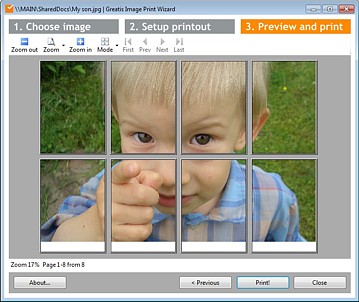
Image Print Wizard is an image print utility that
allows multipage printing of your image in simple 3
steps.
1. Choose image.
Click the "Load image..." button or empty space of the
window and choose your image to print.
2. Setup printout.
The "Image size" mode allows multipage printing, so if
your image is too large for printing on the one page,
it will be splitted and printed on several page. By
default, "Image size" mode prints image in its native
resolution using image size and DPI of image and
printer, but you can change the target size with
the "Scale" parameter. This parameter works for
the "Fit to page" mode too. 100% is size of image
fitted to page, when "Scale" is more than 100% in this
mode, the image will be clipped. The "Stretch to page"
mode stretches image to entire page with potential
proportional distortions. The "Scale" parameter is not
allows multipage printing of your image in simple 3
steps.
1. Choose image.
Click the "Load image..." button or empty space of the
window and choose your image to print.
2. Setup printout.
The "Image size" mode allows multipage printing, so if
your image is too large for printing on the one page,
it will be splitted and printed on several page. By
default, "Image size" mode prints image in its native
resolution using image size and DPI of image and
printer, but you can change the target size with
the "Scale" parameter. This parameter works for
the "Fit to page" mode too. 100% is size of image
fitted to page, when "Scale" is more than 100% in this
mode, the image will be clipped. The "Stretch to page"
mode stretches image to entire page with potential
proportional distortions. The "Scale" parameter is not
Program details
Publisher
Dmitry VasilievE-mail
Contact the publisherPlatforms
Windows XPFile size
361 KBFile date
10/11/2010License
FreewareInstallation
Install & UninstallRecord updated
11/10/2010


