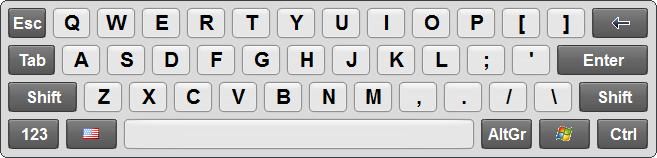

Touch Screen Keyboard
Version 8.1
Shareware
$29.95
1 downloads
Touch Screen Keyboard was developed especially for
touch screen devices: touch screen monitors,
stationary e-kiosks, tablets and others.
Touch Screen Keyboard has two main layouts that can be
quickly switched using a special button: alphabetic
and alpha-numeric.
If you press a key on a touch screen, you will see a
small tooltip window with the corresponding character
in the area not covered with your finger. Windows 7
users will like the support of the multi-touch
technology.
To use Touch Screen Keyboard simply touch the keys of
the on-screen keyboard and each keypress will be sent
to the active application. It works seamlessly with
all standard Windows applications allowing you to type
virtually anywhere a hardware keyboard can be used.
Also you can design your own touchscreen keyboard, or
touch screen devices: touch screen monitors,
stationary e-kiosks, tablets and others.
Touch Screen Keyboard has two main layouts that can be
quickly switched using a special button: alphabetic
and alpha-numeric.
If you press a key on a touch screen, you will see a
small tooltip window with the corresponding character
in the area not covered with your finger. Windows 7
users will like the support of the multi-touch
technology.
To use Touch Screen Keyboard simply touch the keys of
the on-screen keyboard and each keypress will be sent
to the active application. It works seamlessly with
all standard Windows applications allowing you to type
virtually anywhere a hardware keyboard can be used.
Also you can design your own touchscreen keyboard, or
Program details
Publisher
Sergey KoshkinE-mail
Contact the publisherPlatforms
Windows 2000<br>Windows XPFile size
5345 KBFile date
12/16/2013License
SharewareInstallation
Install & UninstallRecord updated
12/18/2013


