
4Media 2D to 3D Video Converter for Mac
Version 1.1.0.20121224
Shareware
$39.99
3 downloads
4Media 2D to 3D Video Converter for Mac is advanced
stereoscopic 3D environment.
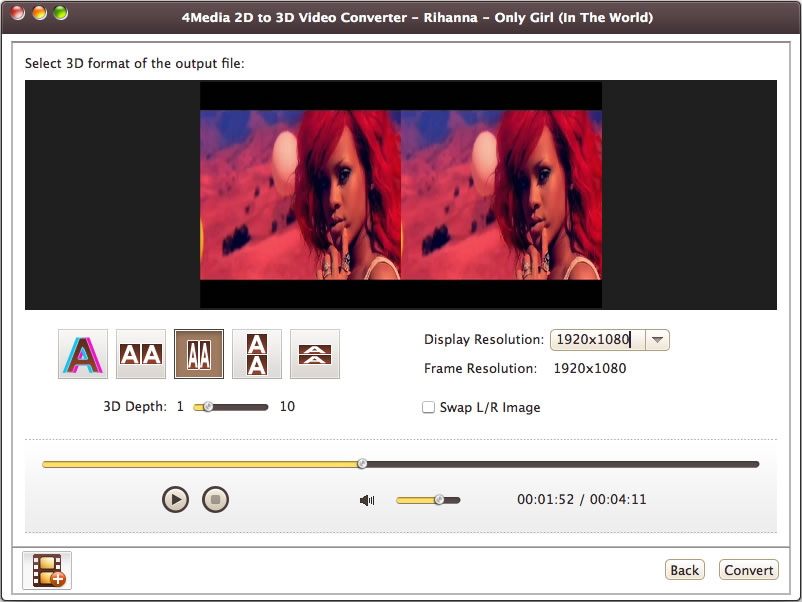
4Media 2D to 3D Video Converter for Mac is
stereoscopic 3D environment, It enables you to convert
2D standard video to 3d video; Users can get the
output as one file in side-by-side or top/bottom
format, or as anaglyph video such as Red/cyan. 4Media
2D to 3D Video Converter for Mac can convert a normal
2D video to fantastic 3D video available in a variety
of formats like AVI, MP4, MKV, FLV, M2TS, TS, etc. The
output 3D of 2D to 3D Converter can be side-by-side
3D, anaglyph 3D, and two separate files, and can be
played on computer, some 3D TV, glasses-free 3D Smart
phones, or other compatible 3D display device.
Features
1. Normal video can be converted into 3D video,
and in a variety of different 3D formats. Create
Anaglyph Red/Cyan 3D video or a Side-by-Side 3D video
(Left/Right 3D video) or Top/bottom format. Even
Support conversion of 3D video to standard 2D video.
2. You can increase/decrease the 3D depth or
toggle it on/off in real time so as to personalize and
customize your own special 3D video.
3. In 3D mode, each eye receives the full
resolution of the display for the highest possible
image quality for text and objects.
4. If you decide to switch back to 2D at any
time, just do so by pressing 3D to 2D button.
5. The 3D format can be Left/Right (side-by-
side), or top/bottom according to the requirement of
some playback equipment. You can freely choose between
the two formats.
6. The inputs and outputs of 2D to 3D Converter
is rich in format. Various 2D videos in different
popular formats such as AVI, MP4, FLV, MKV, M2TS, or
TS HD Video (*.ts) can be converted in 3D videos.
7. Choose from a list of language interfaces
including English, German, Chinese, French and
Japanese.
stereoscopic 3D environment.
4Media 2D to 3D Video Converter for Mac is
stereoscopic 3D environment, It enables you to convert
2D standard video to 3d video; Users can get the
output as one file in side-by-side or top/bottom
format, or as anaglyph video such as Red/cyan. 4Media
2D to 3D Video Converter for Mac can convert a normal
2D video to fantastic 3D video available in a variety
of formats like AVI, MP4, MKV, FLV, M2TS, TS, etc. The
output 3D of 2D to 3D Converter can be side-by-side
3D, anaglyph 3D, and two separate files, and can be
played on computer, some 3D TV, glasses-free 3D Smart
phones, or other compatible 3D display device.
Features
1. Normal video can be converted into 3D video,
and in a variety of different 3D formats. Create
Anaglyph Red/Cyan 3D video or a Side-by-Side 3D video
(Left/Right 3D video) or Top/bottom format. Even
Support conversion of 3D video to standard 2D video.
2. You can increase/decrease the 3D depth or
toggle it on/off in real time so as to personalize and
customize your own special 3D video.
3. In 3D mode, each eye receives the full
resolution of the display for the highest possible
image quality for text and objects.
4. If you decide to switch back to 2D at any
time, just do so by pressing 3D to 2D button.
5. The 3D format can be Left/Right (side-by-
side), or top/bottom according to the requirement of
some playback equipment. You can freely choose between
the two formats.
6. The inputs and outputs of 2D to 3D Converter
is rich in format. Various 2D videos in different
popular formats such as AVI, MP4, FLV, MKV, M2TS, or
TS HD Video (*.ts) can be converted in 3D videos.
7. Choose from a list of language interfaces
including English, German, Chinese, French and
Japanese.
Program details
Publisher
4Media Software StudioE-mail
Contact the publisherPlatforms
Macintosh PPCFile size
37765 KBFile date
12/26/2012License
SharewareInstallation
Install & UninstallRecord updated
1/5/2013
