
M8 Free Clipboard 2
Version 23.05
Freeware
Free
4 downloads
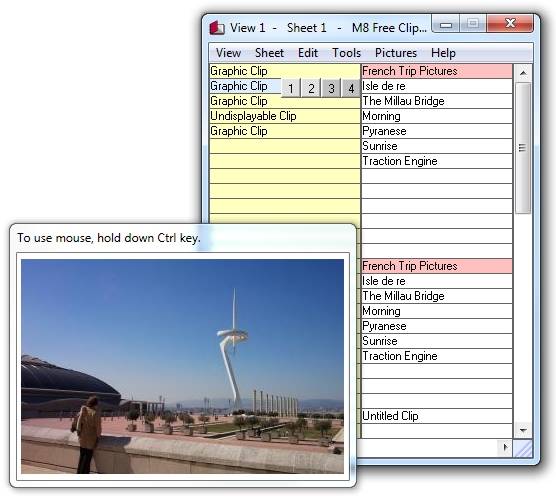
M8 is the simplest of all multi-clipboard and screen
capture programs. Just have it running minimized and
it captures everything you cut or copy from other
programs. It keeps up to 500 clips. When you want to
paste one back, all you have to do is restore M8 and
click on the clip you want. When you move the mouse
over the clips, you can see them in the viewer. If the
clip is text, you see several lines and if it is a
graphic, you see a thumbnail. - SCREEN SHOTS - To
capture the entire screen press Prt Scr. - To capture
the active window press Alt+PrtScr - To capture an
individual graphic from Internet Explorer or AOL,
point to the graphic, right click and select "Copy"
from the drop down list. M8 also allows you to paste
your digital photos directly into the body of Outlook,
Windows Mail, Mozilla and other email programs.
capture programs. Just have it running minimized and
it captures everything you cut or copy from other
programs. It keeps up to 500 clips. When you want to
paste one back, all you have to do is restore M8 and
click on the clip you want. When you move the mouse
over the clips, you can see them in the viewer. If the
clip is text, you see several lines and if it is a
graphic, you see a thumbnail. - SCREEN SHOTS - To
capture the entire screen press Prt Scr. - To capture
the active window press Alt+PrtScr - To capture an
individual graphic from Internet Explorer or AOL,
point to the graphic, right click and select "Copy"
from the drop down list. M8 also allows you to paste
your digital photos directly into the body of Outlook,
Windows Mail, Mozilla and other email programs.
Program details
Publisher
John TurnbullE-mail
Contact the publisherPlatforms
Win7 x32<br>Win7 x64<br>Windows XP<br>Windows 98<br>WinVista<br>WinVista x64<br>WinOther<br>OtherFile size
4187 KBFile date
2/20/2016License
FreewareExpiration info
does not expireInstallation
Install & UninstallRecord updated
2/20/2016


