Active Backup Expert Pro
Version 1.60
Shareware
$45.00
4 downloads
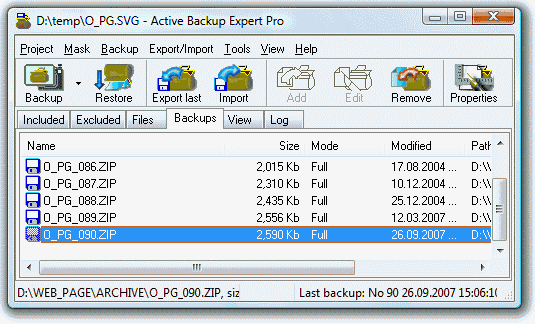
An easily mastered tool creates the automated or
manual backups of local and network files in .zip
format on hard disks, CDs and other removable devices,
in a local or a wide network. A Wizard guides you
through the steps of a backup-set creation: supplying
the paths and filters for included and excluded files,
specifying the storage folder and setting to schedule,
selecting the incremental or differential backup
method. Enabling file inclusion on the date-time
basis, you will back up the new and changed files
only. Having configured the backup-set only once, you
are free to create as many backup copies as you wish.
You can easily restore the files stored in a backup,
view or edit their content. The export and import
features are useful to synchronize the folders on two
or more PCs and to span the large backups across the
multiple disks. Other features include selecting files
by size and attributes, creating self-extracting
backups and the support for the Command-line and
ActiveX automation. The ample documentation is also
available. The ABE Pro creates the unattended backups
by using the Active Task Manager included into the
installation package. This automation utility can work
as a stand-alone application to help you to schedule
other tasks. Though, you can use the MS Task Scheduler
to automate a backup creation as well.
manual backups of local and network files in .zip
format on hard disks, CDs and other removable devices,
in a local or a wide network. A Wizard guides you
through the steps of a backup-set creation: supplying
the paths and filters for included and excluded files,
specifying the storage folder and setting to schedule,
selecting the incremental or differential backup
method. Enabling file inclusion on the date-time
basis, you will back up the new and changed files
only. Having configured the backup-set only once, you
are free to create as many backup copies as you wish.
You can easily restore the files stored in a backup,
view or edit their content. The export and import
features are useful to synchronize the folders on two
or more PCs and to span the large backups across the
multiple disks. Other features include selecting files
by size and attributes, creating self-extracting
backups and the support for the Command-line and
ActiveX automation. The ample documentation is also
available. The ABE Pro creates the unattended backups
by using the Active Task Manager included into the
installation package. This automation utility can work
as a stand-alone application to help you to schedule
other tasks. Though, you can use the MS Task Scheduler
to automate a backup creation as well.
Program details
Publisher
OrionSoftLabE-mail
Contact the publisherHome page
http://www.orionsoftlab.com/Platforms
Windows 95/98/ME/2000/XPFile size
2274 KBFile date
4/4/2002License
SharewareExpires after
30 daysExpiration info
User can not create a new backup after 30-day trial without a registration.Installation
Install & UninstallRecord updated
4/12/2002
