
SterJo Startup Patrol
Version 1.4
Freeware
Free
0 downloads
The more applications are set to automatically launch at startup, the longer it will take your PC to boot. So If you want to edit, delete or manage the items in your Windows startup you need a simple tool called SterJo Startup Patrol.
SterJo Startup Patrol is a free startup application editor which you can use to edit list of programs that are starting with Windows. By managing those programs you can significantly reduce the Windows startup time and also speed up computer. You can also add new items which can come in handy in many situations. It is a very useful and easy to use free startup program editor. With only a few clicks you can significantly improve the overall performance of your Windows startup.
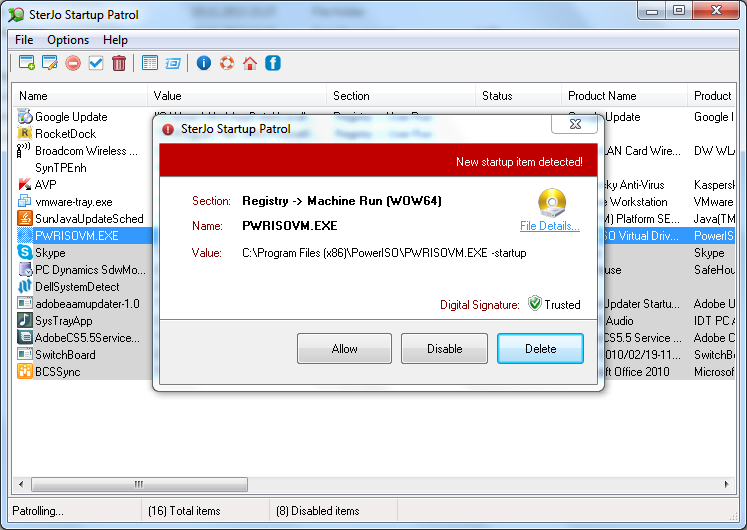
When you first start the SterJo Startup Patrol, you will be asked to allow, disable or delete certain programs that are starting with Windows, which aren't standard services. You can also add, remove etc with a simple mouse click.
Some of the key features of the SterJo Startup Patrol free program are:
• Option to disable, enable or even delete an item that is starting with Windows
• Ability to create new items that will start with Windows
• Option to view and modify item properties or execute the selected item instantly
The system requirements for running SterJo Startup Patrol are quite low: 512 MB of RAM memory, 3 MB of hard drive space and Windows operating system. It also works on both 32-bit and 64-bit versions of Windows XP, Windows Vista, Windows 7 and Windows 8.
SterJo Startup Patrol is a free startup application editor which you can use to edit list of programs that are starting with Windows. By managing those programs you can significantly reduce the Windows startup time and also speed up computer. You can also add new items which can come in handy in many situations. It is a very useful and easy to use free startup program editor. With only a few clicks you can significantly improve the overall performance of your Windows startup.
When you first start the SterJo Startup Patrol, you will be asked to allow, disable or delete certain programs that are starting with Windows, which aren't standard services. You can also add, remove etc with a simple mouse click.
Some of the key features of the SterJo Startup Patrol free program are:
• Option to disable, enable or even delete an item that is starting with Windows
• Ability to create new items that will start with Windows
• Option to view and modify item properties or execute the selected item instantly
The system requirements for running SterJo Startup Patrol are quite low: 512 MB of RAM memory, 3 MB of hard drive space and Windows operating system. It also works on both 32-bit and 64-bit versions of Windows XP, Windows Vista, Windows 7 and Windows 8.
Program details
Publisher
SterJo SoftwareE-mail
Contact the publisherHome page
http://www.sterjosoft.com/Platforms
WinVista,WinVista x64,Windows XP,Win7 x32,Win7 x64,Win8 x32,Win8 x64,WinServerFile size
894 KBFile date
11/20/2013License
FreewareExpires after
30 daysInstallation
Install & UninstallRecord updated
5/25/2015


