
Apeaksoft iPhone Data Recovery
Version 1.2.8
Shareware
$27.45
3 downloads
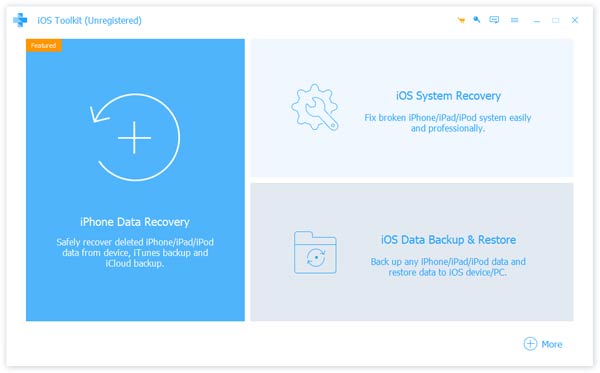
Apeaksoft iPhone Data Recovery can recover lost Messages, Contacts, Call History, Calendar, Notes, Voice memos, QQ/WeChat data, Photos, etc. from iOS devices or from iTunes/iCloud backup files. It supports many portable iOS devices, including iPhone, iPad, iPod Touch, etc. And it allows you to preview your lost data before recovery.
Key functions:
1. Recover lost data from iOS devices
Apeaksoft iPhone Data Recovery is able to recover lost data such as Contacts, Text Messages/iMessages, Call history, Calendar, Notes, Reminder, Safari bookmark, Safari history, Photos, Voice memos from iPhone/iPad/iPod, etc.
2. Recover data from iTunes/iCloud backup files
No matter what type of your device is, Apeaksoft iPhone Data Recovery can recover lost data as long as your device has been backed up with iTunes/iCloud. So if your data was deleted incautiously or intentionally, you can get them back.
3. iOS System Recovery function
iOS System Recovery function can help you fix your iOS system back to normal in various situations including stuck in recovery/DFU mode, white Apple logo, black screen, looping on start, etc. In addition, with this function, you are able to upgrade or downgrade the iOS devices system.
4. iOS Data Backup and Restore function
iOS Data Backup and Restore function allows you to back up your iOS data to computer in one click and you could also restore the backup files to iOS devices or computer.
5. WhatsApp Transfer function
With the WhatsApp Transfer function, you could transfer WhatsApp data between iOS devices. In addition, you are able to back up your WhatsApp data and restore the backed up data to computer or iOS devices.
Key functions:
1. Recover lost data from iOS devices
Apeaksoft iPhone Data Recovery is able to recover lost data such as Contacts, Text Messages/iMessages, Call history, Calendar, Notes, Reminder, Safari bookmark, Safari history, Photos, Voice memos from iPhone/iPad/iPod, etc.
2. Recover data from iTunes/iCloud backup files
No matter what type of your device is, Apeaksoft iPhone Data Recovery can recover lost data as long as your device has been backed up with iTunes/iCloud. So if your data was deleted incautiously or intentionally, you can get them back.
3. iOS System Recovery function
iOS System Recovery function can help you fix your iOS system back to normal in various situations including stuck in recovery/DFU mode, white Apple logo, black screen, looping on start, etc. In addition, with this function, you are able to upgrade or downgrade the iOS devices system.
4. iOS Data Backup and Restore function
iOS Data Backup and Restore function allows you to back up your iOS data to computer in one click and you could also restore the backup files to iOS devices or computer.
5. WhatsApp Transfer function
With the WhatsApp Transfer function, you could transfer WhatsApp data between iOS devices. In addition, you are able to back up your WhatsApp data and restore the backed up data to computer or iOS devices.
Program details
Publisher
Apeaksoft StudioE-mail
Contact the publisherHome page
https://www.apeaksoft.com/Platforms
Win7 x32,Win7 x64,Win8 x32,Win8 x64,Windows 10File size
2130 KBFile date
2/20/2025License
SharewareExpires on
12/16/2022Installation
Install & UninstallRecord updated
2/21/2025