
Aiseesoft Free video Editor for Mac
Version 1.1.16
Freeware
Free
1 downloads
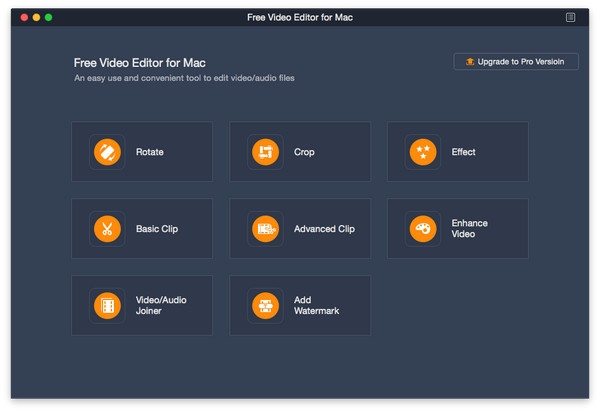
Want to remove black bars around your videos? Want to clip your videos? Want to rotate your videos? Aiseesoft Free Video Editor for Mac could help you.
Key functions:
1. Rotate and flip videos
With Aiseesoft Free Video Editor for Mac, you could rotate the video 90 clockwise or 90 counterclockwise. In addition, you could also flip video vertically or horizontally according to your need.
2. Crop, clip/join videos
Aiseesoft Free Video Editor for Mac can remove the unnecessary black bars around your videos with its crop function. It provides four modes: Pan & Scan, Letterbox, Medium and Full for users, so you could choose the one as you like. If you want to cut off the unwanted part of your media files, you could use the clip function of Aiseesoft Free Video Editor for Mac to remove the part you do not want. Moreover, you can use the video/audio joiner feature to fulfill your goals.
3. Convert video/audio files
Aiseesoft Free Video Editor for Mac could also be a free video converter, it could convert various media files to other formats like MP4, M4V, AVI, FLV, MP3, FLAC, AIFF, OGG, and more.
4. Edit video effects
Aiseesoft Free Video Editor for Mac also provides video editing feature for you to adjust the brightness, contrast, saturation, hue, and audio volume of your video files. Adding watermark to your videos is also possible.
Key functions:
1. Rotate and flip videos
With Aiseesoft Free Video Editor for Mac, you could rotate the video 90 clockwise or 90 counterclockwise. In addition, you could also flip video vertically or horizontally according to your need.
2. Crop, clip/join videos
Aiseesoft Free Video Editor for Mac can remove the unnecessary black bars around your videos with its crop function. It provides four modes: Pan & Scan, Letterbox, Medium and Full for users, so you could choose the one as you like. If you want to cut off the unwanted part of your media files, you could use the clip function of Aiseesoft Free Video Editor for Mac to remove the part you do not want. Moreover, you can use the video/audio joiner feature to fulfill your goals.
3. Convert video/audio files
Aiseesoft Free Video Editor for Mac could also be a free video converter, it could convert various media files to other formats like MP4, M4V, AVI, FLV, MP3, FLAC, AIFF, OGG, and more.
4. Edit video effects
Aiseesoft Free Video Editor for Mac also provides video editing feature for you to adjust the brightness, contrast, saturation, hue, and audio volume of your video files. Adding watermark to your videos is also possible.
Program details
Publisher
Aiseesoft StudioE-mail
Contact the publisherPlatforms
Mac OS XFile size
53701 KBFile date
8/18/2022License
FreewareInstallation
Install & UninstallRecord updated
8/21/2022
