
Lunacy for Mac
Version 9.2.1
Freeware
Free
3 downloads
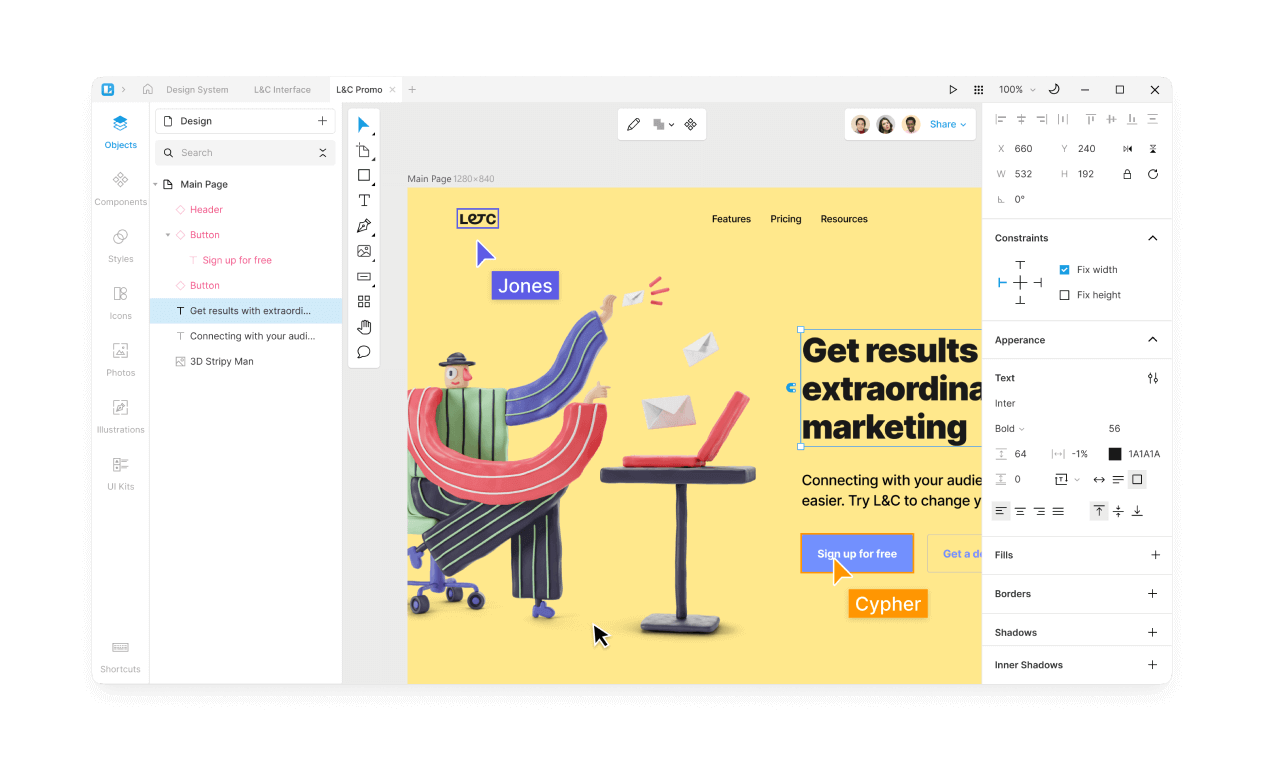
Lunacy is an all-in-one next-gen vector editor for UI, UX, and Web design. It combines the best features of designer apps to bring you the most enjoyable experience possible. Take advantage of the built-in graphics library, use powerful AI tools, and collaborate on projects with your team on several platforms simultaneously! Lunacy offers cross-app format support, offline use and cloud storage. It has it all and even more. Faster than Figma!
100% FREE
Lunacy is absolutely free for both personal and commercial use.
CROSS-PLATFORM SUPPORT
Lunacy runs on Windows, macOS, and Linux.
REAL-TIME COLLABORATION
Collaborate in real time on the same project with other users on different platforms.
BUILT-IN GRAPHICS
Find everything you need in one place:
- Icons
- Photos
- Illustrations
AI TOOLS ONBOARD
Our AI will help you save a lot of time:
- Background remover
- Image enhancer
- Avatar generator
- Text generator
NO CONNECTION NEEDED
Choose freely between cloud and local documents. Switch anytime! Cloud-based files can be accessed from anywhere, allow up to 10 simultaneous designers to work, and offer commenting, observer mode and other collaboration benefits, but with local documents you can take a break from the team hustle and save some bandwidth!
SMOOTH LEARNING CURVE
Ever tried Sketch or Figma? If you have, then Lunacy will feel like home.
FULL SKETCH FILES SUPPORT
Lunacy natively works with the Sketch format. Open, edit, and save .sketch files however and whenever you want. Lunacy can handle both dusty kits from SketchAppSources and the latest versions of .sketch files.
LOW SYSTEM REQUIREMENTS
Lunacy is not demanding on hardware and runs smoothly even on dated machines.
ENDLESS POSSIBILITIES
Thanks to the native support of the .sketch format, you can use Lunacy with all major hand-off and version control tools like Avocode, Zeplin, Abstract, Simpli, etc. And you can easily import .sketch files into Figma or XD if needed.
100% FREE
Lunacy is absolutely free for both personal and commercial use.
CROSS-PLATFORM SUPPORT
Lunacy runs on Windows, macOS, and Linux.
REAL-TIME COLLABORATION
Collaborate in real time on the same project with other users on different platforms.
BUILT-IN GRAPHICS
Find everything you need in one place:
- Icons
- Photos
- Illustrations
AI TOOLS ONBOARD
Our AI will help you save a lot of time:
- Background remover
- Image enhancer
- Avatar generator
- Text generator
NO CONNECTION NEEDED
Choose freely between cloud and local documents. Switch anytime! Cloud-based files can be accessed from anywhere, allow up to 10 simultaneous designers to work, and offer commenting, observer mode and other collaboration benefits, but with local documents you can take a break from the team hustle and save some bandwidth!
SMOOTH LEARNING CURVE
Ever tried Sketch or Figma? If you have, then Lunacy will feel like home.
FULL SKETCH FILES SUPPORT
Lunacy natively works with the Sketch format. Open, edit, and save .sketch files however and whenever you want. Lunacy can handle both dusty kits from SketchAppSources and the latest versions of .sketch files.
LOW SYSTEM REQUIREMENTS
Lunacy is not demanding on hardware and runs smoothly even on dated machines.
ENDLESS POSSIBILITIES
Thanks to the native support of the .sketch format, you can use Lunacy with all major hand-off and version control tools like Avocode, Zeplin, Abstract, Simpli, etc. And you can easily import .sketch files into Figma or XD if needed.
Program details
Publisher
Icons8 LLCE-mail
Contact the publisherHome page
http://icons8.com/lunacyPlatforms
Mac OS XFile size
167350 KBFile date
8/21/2023License
FreewareInstallation
Install & UninstallRecord updated
9/20/2023
