
ExtraSubst x64
Version 9.1
Shareware
$14.99
2 downloads
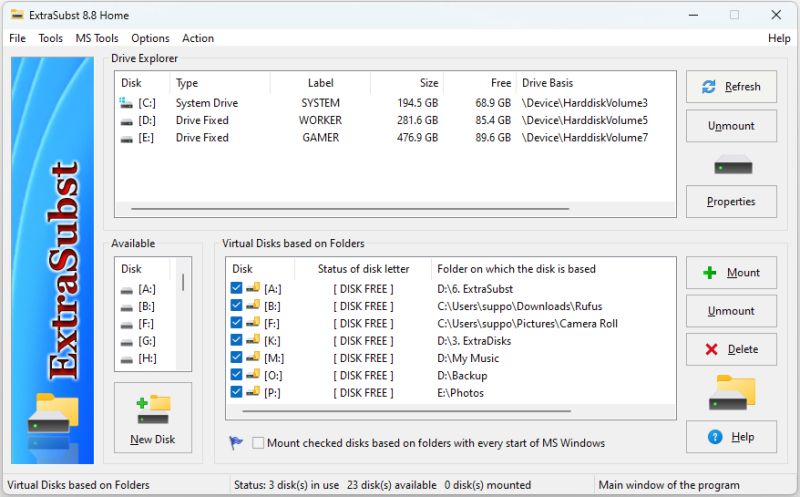
ExtraSubst - the program is designed to make access to frequently used folders of your computer much easier. ExtraSubst expands the capabilities of the system subst.exe utility and creates virtual disks on the basis of selected folders in both system modes: Elevated and Non-Elevated using GUI interface. Physical drives remain unchanged and are not divided into additional partitions. ExtraSusbst is compatible with ExtraDisks software.
Example 1: By default the folder "My Documents" is situated in the operational system MS Windows rather uncomfortably: "C:\Documents and Settings\User Name\My Documents\" With the help of the program ExtraSubst you can create a virtual disk - for example disk D: and select "My Documents" folder. After that, in your system the disk D: will appear in which your documents will be kept. To access your documents you just click the disk icon D: and there is no need to look for it in a folders tree.
Example 2: You can create virtual disk for any folders which you work often. For example, you can create disk M: for the folder with your musical files "e:\archive\music\", disk V: for the folder with your video files "e:\archive\video\" or disk G: for the folder with your games and you do not need to divide your hard drive into additional partitions for that.
Example 3: If you are a web designer, you can make the project folder a separate drive. In this case, your project will be the same as if it were on a server on the Internet.
Example 1: By default the folder "My Documents" is situated in the operational system MS Windows rather uncomfortably: "C:\Documents and Settings\User Name\My Documents\" With the help of the program ExtraSubst you can create a virtual disk - for example disk D: and select "My Documents" folder. After that, in your system the disk D: will appear in which your documents will be kept. To access your documents you just click the disk icon D: and there is no need to look for it in a folders tree.
Example 2: You can create virtual disk for any folders which you work often. For example, you can create disk M: for the folder with your musical files "e:\archive\music\", disk V: for the folder with your video files "e:\archive\video\" or disk G: for the folder with your games and you do not need to divide your hard drive into additional partitions for that.
Example 3: If you are a web designer, you can make the project folder a separate drive. In this case, your project will be the same as if it were on a server on the Internet.
Program details
Publisher
WT SEG, Ltd.E-mail
Contact the publisherHome page
http://www.extrasubst.com/Platforms
Win7 x32,Win7 x64,Win8 x32,Win8 x64,Windows 10,WinServer,Windows XP,Windows 2000,Windows NT 4.xFile size
859 KBFile date
1/25/2024License
SharewareExpires after
21 daysInstallation
Install & UninstallRecord updated
1/25/2024


