
Warehousing Barcode Labels Tool
Version 8.3.6
Shareware
$49.00
0 downloads
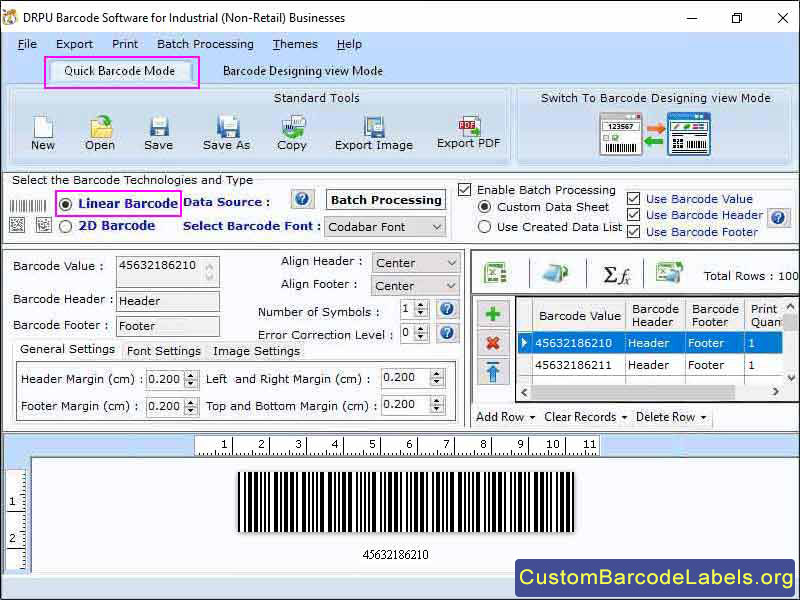
Manufacturing Labelling Tool is used to speed up the process of shipping and receiving goods. Applications offer various series like random, sequential, and constant values that allow users to create multiple barcodes at a time. The following steps define the functionality of the Barcode label tool for manufacturing industry.
Step 1: Download and launch the manufacturing industry barcode software and then select barcode setting option.
Step 2: Software gives linear or 2D barcode font standards to the user. Select the appropriate barcode font of your choice.
Step 3: User can change header, footer, and value of the barcode and also set the density and height.
Step 4: In general setting option, user can set the dimensions and margin of the barcode according to the requirement.
Step 5: Select Barcode designing view mode where user can create barcode labels with some additional functionality.
Step 6: In card properties option, user can change the shape of the label, set the name, set the inserted image property, and can fill the background with color or a picture according to the requirement.
Step 7: Click on drawing tool option where user can insert pre-defined images from library, custom shapes, create a watermark on label, etc.
Step 8: Click on batch processing option that helps the user to create multiple numbers of barcode labels with different values very easily.
Step 9: User can save the labels into different file formats like JPEG, PNG, PDF, etc.
Step 10: Click on print option, and set the page properties, margins, label, orientation, and size or spacing. User can preview the page before printing to avoid mistakes and then click on print button.
Highlighted Features:
* Easily modify the color, font, and image of a barcode label.
* Print designed barcode labels with advanced barcode print settings.
* User can save barcode labels at any desired location for future use.
Step 1: Download and launch the manufacturing industry barcode software and then select barcode setting option.
Step 2: Software gives linear or 2D barcode font standards to the user. Select the appropriate barcode font of your choice.
Step 3: User can change header, footer, and value of the barcode and also set the density and height.
Step 4: In general setting option, user can set the dimensions and margin of the barcode according to the requirement.
Step 5: Select Barcode designing view mode where user can create barcode labels with some additional functionality.
Step 6: In card properties option, user can change the shape of the label, set the name, set the inserted image property, and can fill the background with color or a picture according to the requirement.
Step 7: Click on drawing tool option where user can insert pre-defined images from library, custom shapes, create a watermark on label, etc.
Step 8: Click on batch processing option that helps the user to create multiple numbers of barcode labels with different values very easily.
Step 9: User can save the labels into different file formats like JPEG, PNG, PDF, etc.
Step 10: Click on print option, and set the page properties, margins, label, orientation, and size or spacing. User can preview the page before printing to avoid mistakes and then click on print button.
Highlighted Features:
* Easily modify the color, font, and image of a barcode label.
* Print designed barcode labels with advanced barcode print settings.
* User can save barcode labels at any desired location for future use.
Program details
Publisher
Custom Barcode LabelE-mail
Contact the publisherHome page
https://www.custombarcodelabels.org/custom-barcode-labels/barcode-industrial-manufacturing.htmlPlatforms
Win7 x32,Win7 x64,Windows 10,Windows XP,WinVista x64,OtherFile size
5140 KBFile date
11/5/2023License
SharewareInstallation
Install & UninstallRecord updated
11/7/2023


