
Photo Studio Preview
Version 1.5
Freeware
Free
1 downloads
Photo Studio Preview is a free app that automatically displays images as soon as they appear in a user-specified folder. It's ideal for photographers, designers, teachers, or anyone who needs to instantly preview new images without manually opening them.
Key Features (Free Version)
Real-Time Folder Monitoring
The app continuously monitors the selected directory for new files with common image extensions (e.g., JPG, PNG, BMP, GIF, TIFF, etc.). As soon as a new image appears in the folder, it is automatically displayed on screen.
Automatic Refresh
There's no need to manually refresh or reload images - the app instantly responds to any changes in the folder.
Full-Screen Mode
Images can be viewed in full-screen mode for maximum viewing convenience.
Simple and Intuitive Interface
The minimalist design makes it easy - even for beginners - to set up and use the app quickly.
Support for Major Image Formats
Includes JPG, JPEG, PNG, BMP, static GIFs, TIFF, and other common graphic formats.
Advanced Features (Pro Version - Paid)
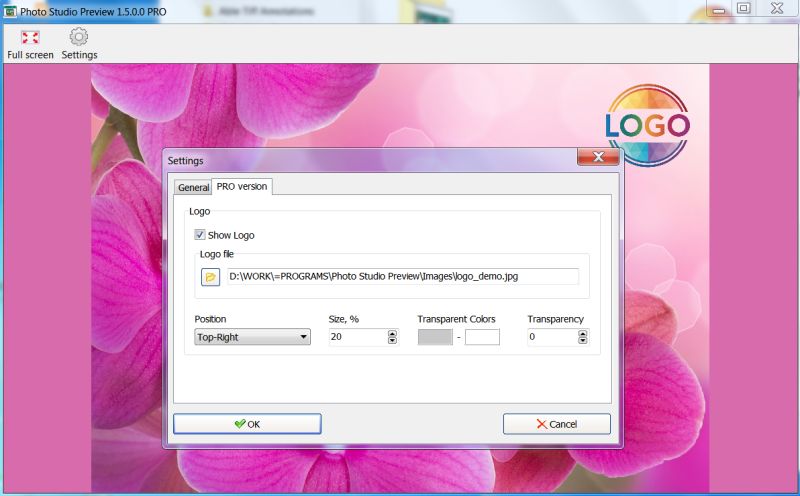
Logo or Watermark Overlay
Users can overlay their own logo, text, or watermark on displayed images - ideal for branding, copyright protection, or indicating company affiliation.
Flexible Appearance Customization
Adjust the watermark's position, opacity, size, and color. Supports both text-based and image-based logos.
Priority Technical Support
Pro users receive expedited assistance from the development team.
Use Cases
Event Photographers
Instantly preview photos transferred from a camera to a folder via Wi-Fi or cable.
Educational Institutions
Display student work in real time on a large screen.
Digital Exhibitions or Installations
Automatically showcase content uploaded by a curator to a designated folder.
Image Quality Control
Quickly review generated or processed images as part of a production workflow.
Key Features (Free Version)
Real-Time Folder Monitoring
The app continuously monitors the selected directory for new files with common image extensions (e.g., JPG, PNG, BMP, GIF, TIFF, etc.). As soon as a new image appears in the folder, it is automatically displayed on screen.
Automatic Refresh
There's no need to manually refresh or reload images - the app instantly responds to any changes in the folder.
Full-Screen Mode
Images can be viewed in full-screen mode for maximum viewing convenience.
Simple and Intuitive Interface
The minimalist design makes it easy - even for beginners - to set up and use the app quickly.
Support for Major Image Formats
Includes JPG, JPEG, PNG, BMP, static GIFs, TIFF, and other common graphic formats.
Advanced Features (Pro Version - Paid)
Logo or Watermark Overlay
Users can overlay their own logo, text, or watermark on displayed images - ideal for branding, copyright protection, or indicating company affiliation.
Flexible Appearance Customization
Adjust the watermark's position, opacity, size, and color. Supports both text-based and image-based logos.
Priority Technical Support
Pro users receive expedited assistance from the development team.
Use Cases
Event Photographers
Instantly preview photos transferred from a camera to a folder via Wi-Fi or cable.
Educational Institutions
Display student work in real time on a large screen.
Digital Exhibitions or Installations
Automatically showcase content uploaded by a curator to a designated folder.
Image Quality Control
Quickly review generated or processed images as part of a production workflow.
Program details
Publisher
GraphicRegion.comE-mail
Contact the publisherPlatforms
Win7 x32,Win7 x64,Win8 x32,Win8 x64,Windows 10,WinServer,Windows XP,Windows 2000,Windows NT 4.x,WinVista x64File size
5141 KBFile date
11/11/2025License
FreewareInstallation
Install & UninstallRecord updated
11/11/2025


