
KIPPING's SpamDeleter
Version 1.0
Commercial Demo
Free
0 downloads
KIPPINGs SpamDeleter is a little program to cleanup
Email-Mailboxes from unwanted messages. Through a huge
number of predefined filters SpamDeleter recognizes
the type of the message. Unwanted mails will be
deleted automatically from the mailbox. The user may
also add, change or delete any filter to match the
program his personal needs. The number of mailboxes is
not limited - so several mailboxes can be connected
same time.
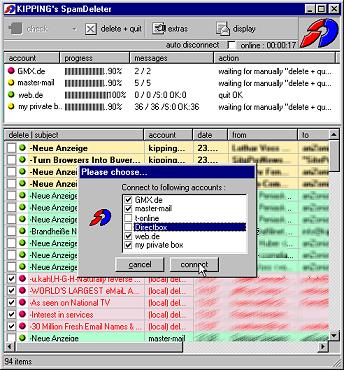
Using SpamDeleter is very simple. The user interface
is designed intuitively for easily accessing any of
the functions the programm offers. To start the
querying-process of the mailboxes - the check-button
has to be pressed with the mouse. The program can be
set to automatically start this process also.
Depending on the programs preferences - all activated
mailbox accounts will be processed immediately or
after an inquiry of SpamDeleter respectively. The
program will now open a connection to the mailbox(es).
All contained messages will be downloaded by the
program. At this - the messages will be inspected
through predefined filters whether they include Spam-
contents. If they classified as *unwanted* they will
be deleted in the mailbox. The other messages will
last in the mailbox and can be loaded with other email
program. They also can be deleted with SpamDeleter
manually. Loaded messages will be displayed in the
lower list in the main window. After the inspection
process of each message the state of it will be
recognizeable by the leading symbol or the colour of
the line. The course of the procedures to start may
also be running in an automatic manner. For instance
the querying of the mailboxes or possibly
disconnecting an existing Internet connection may be
carried out automatically. This can be adjusted in the
properties-window.
Email-Mailboxes from unwanted messages. Through a huge
number of predefined filters SpamDeleter recognizes
the type of the message. Unwanted mails will be
deleted automatically from the mailbox. The user may
also add, change or delete any filter to match the
program his personal needs. The number of mailboxes is
not limited - so several mailboxes can be connected
same time.
Using SpamDeleter is very simple. The user interface
is designed intuitively for easily accessing any of
the functions the programm offers. To start the
querying-process of the mailboxes - the check-button
has to be pressed with the mouse. The program can be
set to automatically start this process also.
Depending on the programs preferences - all activated
mailbox accounts will be processed immediately or
after an inquiry of SpamDeleter respectively. The
program will now open a connection to the mailbox(es).
All contained messages will be downloaded by the
program. At this - the messages will be inspected
through predefined filters whether they include Spam-
contents. If they classified as *unwanted* they will
be deleted in the mailbox. The other messages will
last in the mailbox and can be loaded with other email
program. They also can be deleted with SpamDeleter
manually. Loaded messages will be displayed in the
lower list in the main window. After the inspection
process of each message the state of it will be
recognizeable by the leading symbol or the colour of
the line. The course of the procedures to start may
also be running in an automatic manner. For instance
the querying of the mailboxes or possibly
disconnecting an existing Internet connection may be
carried out automatically. This can be adjusted in the
properties-window.
Program details
Publisher
Uwe KippingE-mail
Contact the publisherHome page
http://www.kipping.com/sd/index.htmlPlatforms
Windows 95<br>Windows 98<br>Windows ME<br>Windows File size
581 KBFile date
8/19/2002License
Commercial DemoInstallation
Install & UninstallRecord updated
8/24/2002


