
Free Launch Bar
Version 1.0
Freeware
Free
3 downloads
Free Launch Bar is a Free replacement for the standard
Quick Launch bar. All functions presented in Quick
Launch are also in Free Launch Bar. However, the Free
Launch Bar is fully compatible with Quick Launch
because it uses the same folder for shortcuts. But
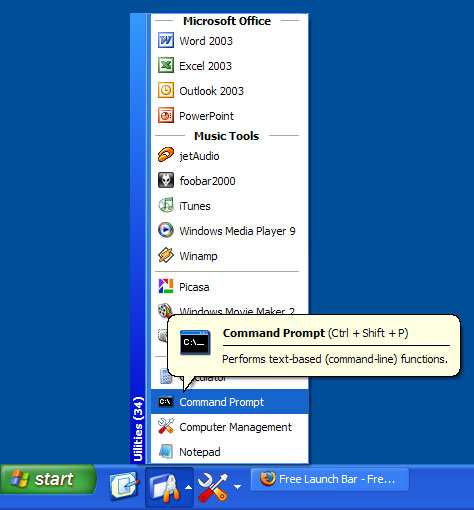
there is one huge difference. Free Launch Bar allows
you to combine your shortcuts into groups. This
feature looks like popup menus. This vastly improves
the management of your shortcuts and save working
space on your desktop. By using Free Launch Bar, you
speed up the launching of your applications like never
before.
The main features of Free Launch Bar:
* Creating menu on taskbar with unlimited levels
* Compatibility with Windows XP
* Integration into Windows Shell
* Low resources
* Compatibility with Quick Launch
* Creating separators to group shortcuts inside menus
* Different view modes
* Hotkeys
* Using PNG pictures as icons
* Support of Windows Drag&Drop technology. To add
shortcuts you can simply drag them into menus
* Improved tips. You can include some of HTML tags
into button description.
* Fast toolbar switching
* Absolutely FREE
Quick Launch bar. All functions presented in Quick
Launch are also in Free Launch Bar. However, the Free
Launch Bar is fully compatible with Quick Launch
because it uses the same folder for shortcuts. But
there is one huge difference. Free Launch Bar allows
you to combine your shortcuts into groups. This
feature looks like popup menus. This vastly improves
the management of your shortcuts and save working
space on your desktop. By using Free Launch Bar, you
speed up the launching of your applications like never
before.
The main features of Free Launch Bar:
* Creating menu on taskbar with unlimited levels
* Compatibility with Windows XP
* Integration into Windows Shell
* Low resources
* Compatibility with Quick Launch
* Creating separators to group shortcuts inside menus
* Different view modes
* Hotkeys
* Using PNG pictures as icons
* Support of Windows Drag&Drop technology. To add
shortcuts you can simply drag them into menus
* Improved tips. You can include some of HTML tags
into button description.
* Fast toolbar switching
* Absolutely FREE
Program details
Publisher
Yuri KobetsE-mail
Contact the publisherHome page
http://www.freelaunchbar.com/Platforms
Windows 95<br>Windows 98<br>Windows ME<br>Windows File size
522 KBFile date
5/11/2004License
FreewareInstallation
Install & UninstallRecord updated
12/1/2004