
PhotoKit Color
Version 1.0.1
Shareware
$99.95
2 downloads
PhotoKit Color is an Adobe Photoshop Plug-in that applies precise color corrections, automatic color balancing and creative coloring effects. PhotoKit Color offers a comprehensive set of coloring tools for Photoshop 7.0 and Photoshop CS for both Macintosh and Windows.
Color plays a huge role in how we perceive and describe the world we see, so it's hardly surprising that one of the first things we want to do to a photograph when we bring it into Photoshop is to adjust accurately or play creatively with the color in the image. Photographers in particular have long desired to reproduce traditional photographic processes digitally using Photoshop.
PhotoKit Color provides a comprehensive suite of effects that let you recreate creative effects like black and white split toning and cross processing. All these effects are applied as separate layers so the user can make further variations, adapting each effect to suit their own tastes. But that's not all! With PhotoKit Color, you can enhance specific colors in your photographs. You can make skin tones less red or lighter. With the Blue Enhance effect you can darken a blue sky and enhance the cloud contrast. And with the RSA Gray Balance set, you can automatically remove colorcasts from almost any type of image.
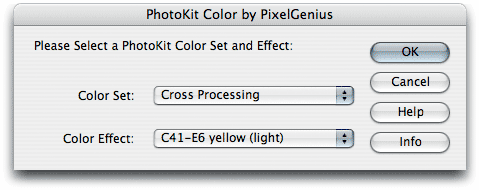
PhotoKit Color's image enhancements and adjustments are easy to use. Choose PhotoKit Color from the File menu's Automate Tools sub-menu, then a simple dialog lets you see the PhotoKit Color tool sets from which you can easily select the desired image effect and let PhotoKit Color do the work.
All PhotoKit Color Effects create a new layer or layers in layer sets labeled with the name of the effect, leaving the original underlying image untouched, so it's always safe to experiment. PhotoKit Color never, ever, changes the underlying image data. By far the easiest way to learn what PhotoKit Color Effects do is to try them - they can't do any harm.
Color plays a huge role in how we perceive and describe the world we see, so it's hardly surprising that one of the first things we want to do to a photograph when we bring it into Photoshop is to adjust accurately or play creatively with the color in the image. Photographers in particular have long desired to reproduce traditional photographic processes digitally using Photoshop.
PhotoKit Color provides a comprehensive suite of effects that let you recreate creative effects like black and white split toning and cross processing. All these effects are applied as separate layers so the user can make further variations, adapting each effect to suit their own tastes. But that's not all! With PhotoKit Color, you can enhance specific colors in your photographs. You can make skin tones less red or lighter. With the Blue Enhance effect you can darken a blue sky and enhance the cloud contrast. And with the RSA Gray Balance set, you can automatically remove colorcasts from almost any type of image.
PhotoKit Color's image enhancements and adjustments are easy to use. Choose PhotoKit Color from the File menu's Automate Tools sub-menu, then a simple dialog lets you see the PhotoKit Color tool sets from which you can easily select the desired image effect and let PhotoKit Color do the work.
All PhotoKit Color Effects create a new layer or layers in layer sets labeled with the name of the effect, leaving the original underlying image untouched, so it's always safe to experiment. PhotoKit Color never, ever, changes the underlying image data. By far the easiest way to learn what PhotoKit Color Effects do is to try them - they can't do any harm.
Program details
Publisher
Tech SupportE-mail
Contact the publisherPlatforms
Windows 98<br>Windows ME<br>Windows 2000<br>WindowFile size
6207 KBFile date
11/16/2004License
SharewareExpires after
7 daysInstallation
Install & UninstallRecord updated
4/20/2005
