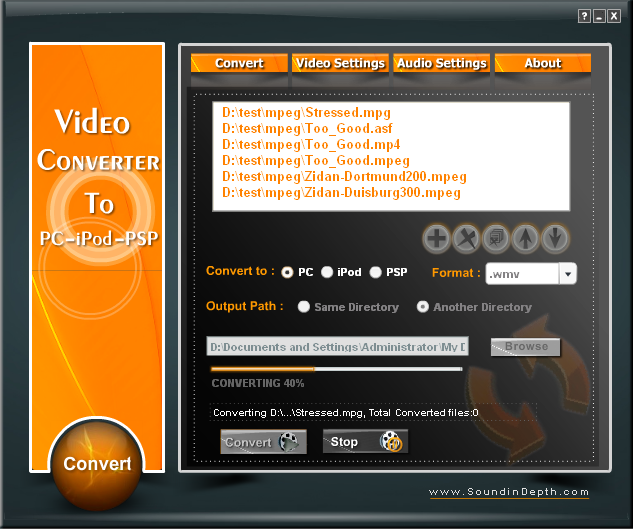
Video Converter to PC-iPod-PSP
Version 1.0.0.0
Freeware
Free
2 downloads
Video Converter to PC-iPod-PSP is an easy to use tool
to convet video files from almost all video files
formats to various video file formats with full
supporting of batch conversion. With Video Converter
to PC-iPod-PSP you can convert from one of the
following video types: AVI,MPEG,MPG,ASF,WMV,MPE, 3GP,
FLV, MKV, MOV (QuickTime), MP4, NUT, Ogg, OGM, Wav,
MPEG-2 (ES,PS,TS,PVA,MP3) To one of the following
video types: AVI,MPEG,MPG,ASF,WMV,MPE, MOV
(QuickTime), MP4, Ogg, OGM. Also you can convert to
any other format from one of the supported video
codec, load a list of video files then convert them
all by one click. You can adjust the settings of the
output video file (i.e. the size, bit
rate...etc "Video Settings and Audio Settings
Pages "). With output video settings window you can
choose container format and change common options for
video (codec, bit rate, scale). With output audio
settings window you can change common options for
audio (codec, bit rate, channel). The supported
formats are: 1) Container formats: 3gp[6], ASF, AVI,
FLV, MKV, MOV (QuickTime), MP4, NUT, Ogg, OGM, Wav,
MPEG-2 (ES,PS,TS,PVA,MP3), AIFF, Raw audio, Raw DV,
FLAC. 2) Video codecs
3ivx, DivX, DV, H.263, H.264/MPEG-4 AVC, HuffYUV,
Indeo 3[7], MJPEG, MPEG-1, MPEG-2, MPEG-4, RealVideo
[8] , Sorenson, Theora, VC-1[9], VP5[9], VP6[9], WMV,
Xvid. 3)Subtitles
DVD, SVCD, DVB, OGM, Matroska, MPEG-4 Timed Text, Text
files, Vobsub. 4) Audio codecs
AAC, AC3, ALAC, AMR[6], DTS, DV Audio, FLAC, MACE,
Monkey's Audio, MP3, QDM2/QDMC, RealAudio[10],
Shorten, Speex, Vorbis, WMA.
to convet video files from almost all video files
formats to various video file formats with full
supporting of batch conversion. With Video Converter
to PC-iPod-PSP you can convert from one of the
following video types: AVI,MPEG,MPG,ASF,WMV,MPE, 3GP,
FLV, MKV, MOV (QuickTime), MP4, NUT, Ogg, OGM, Wav,
MPEG-2 (ES,PS,TS,PVA,MP3) To one of the following
video types: AVI,MPEG,MPG,ASF,WMV,MPE, MOV
(QuickTime), MP4, Ogg, OGM. Also you can convert to
any other format from one of the supported video
codec, load a list of video files then convert them
all by one click. You can adjust the settings of the
output video file (i.e. the size, bit
rate...etc "Video Settings and Audio Settings
Pages "). With output video settings window you can
choose container format and change common options for
video (codec, bit rate, scale). With output audio
settings window you can change common options for
audio (codec, bit rate, channel). The supported
formats are: 1) Container formats: 3gp[6], ASF, AVI,
FLV, MKV, MOV (QuickTime), MP4, NUT, Ogg, OGM, Wav,
MPEG-2 (ES,PS,TS,PVA,MP3), AIFF, Raw audio, Raw DV,
FLAC. 2) Video codecs
3ivx, DivX, DV, H.263, H.264/MPEG-4 AVC, HuffYUV,
Indeo 3[7], MJPEG, MPEG-1, MPEG-2, MPEG-4, RealVideo
[8] , Sorenson, Theora, VC-1[9], VP5[9], VP6[9], WMV,
Xvid. 3)Subtitles
DVD, SVCD, DVB, OGM, Matroska, MPEG-4 Timed Text, Text
files, Vobsub. 4) Audio codecs
AAC, AC3, ALAC, AMR[6], DTS, DV Audio, FLAC, MACE,
Monkey's Audio, MP3, QDM2/QDMC, RealAudio[10],
Shorten, Speex, Vorbis, WMA.
Program details
Publisher
Sound IndepthE-mail
Contact the publisherPlatforms
Windows 95<br>Windows 98<br>Windows ME<br>Windows File size
11125 KBFile date
7/10/2008License
FreewareInstallation
Install & UninstallRecord updated
10/13/2008


