
Demonstration Screen
Version 1.4
Shareware
$10.00
0 downloads
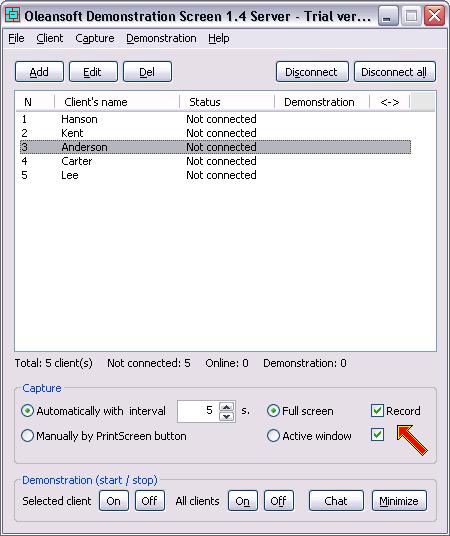
The Demonstration Screen software demonstrates to all
students what is happening on the teacher's PC in
real time. The product makes screenshots of the
teacher PC's monitor (full screen or active window)
automatically with intervals of 1 to 3600 seconds or
manually by PrintScreen button and demonstrates all
screenshots to all students. It works in a local
network or over the Internet and supports up to 100
users simultaneously. You can record all screenshots
into an archive, also, each screenshot may be saved
as a graphic file and printed out. The full-screen
mode allows for student to feel as if he(she) is
sitting in front of the teacher's monitor. You can
send any text messages to your students and they can
answer on it. Password protection for safety is
supported.
students what is happening on the teacher's PC in
real time. The product makes screenshots of the
teacher PC's monitor (full screen or active window)
automatically with intervals of 1 to 3600 seconds or
manually by PrintScreen button and demonstrates all
screenshots to all students. It works in a local
network or over the Internet and supports up to 100
users simultaneously. You can record all screenshots
into an archive, also, each screenshot may be saved
as a graphic file and printed out. The full-screen
mode allows for student to feel as if he(she) is
sitting in front of the teacher's monitor. You can
send any text messages to your students and they can
answer on it. Password protection for safety is
supported.
Program details
Publisher
Andrew KhorkinE-mail
Contact the publisherPlatforms
Windows 98<br>Windows ME<br>Windows NT 4.x<br>WindFile size
707 KBFile date
3/25/2005License
SharewareExpiration info
100 UsesInstallation
Install & UninstallRecord updated
4/17/2005


